Book typography and color design are two of the most important factors in making your book look professional.
Every successful book, blog, magazine, workbook, or digital product share one quality that readers notice immediately—even if they never consciously name it.
It feels easy to read.
The page looks organized. The headings guide the eye. Paragraphs feel balanced. Nothing appears crowded, confusing, or random. The content feels professional before a single idea has been judged.
That reaction is not accidental.
It is designed.
Many creators spend weeks developing content, then rush the final presentation. Fonts are chosen at random. Colors are inconsistent. Spacing is ignored. Headings drift in style from section to section. The result may contain excellent ideas, but it still feels unfinished.
Readers notice this faster than most authors realize.
Before they judge your message, they judge your presentation.
That is why typography and design matter so much. A good presentation builds trust, improves readability, and helps your content feel more valuable. Poor presentation quietly creates resistance.
The good news is that professional design is not magic, and it is no longer reserved for experts. With a few timeless principles—and modern AI tools—you can dramatically improve how your work looks and feels.
In this guide, you will learn how to:
- Choose stronger fonts for headings and body text
- Avoid common layout mistakes that weaken trust
- Build a clean color system
- Improve readability through spacing and structure
- Use AI tools to make smarter design decisions faster
Section 1 – What Is Typography, and Why Does It Matter?
Typography is the way text is arranged on a page or screen. It includes font choice, font size, line spacing, paragraph spacing, margins, alignment, and visual hierarchy.
These details may seem small individually, but together they shape the reader’s entire experience.
Typography influences four major outcomes:
Readability
Can readers move through your content comfortably, or does the page feel tiring?
Hierarchy
Do readers instantly know what matters most?
Flow
Does the content feel smooth and inviting, or cluttered and difficult?
Professional Perception
Does your book feel credible and polished—or rushed and homemade?
When typography is handled well, readers stay focused on the ideas. When handled poorly, the design begins to compete with the message.
The goal of typography is simple:
Make reading effortless.
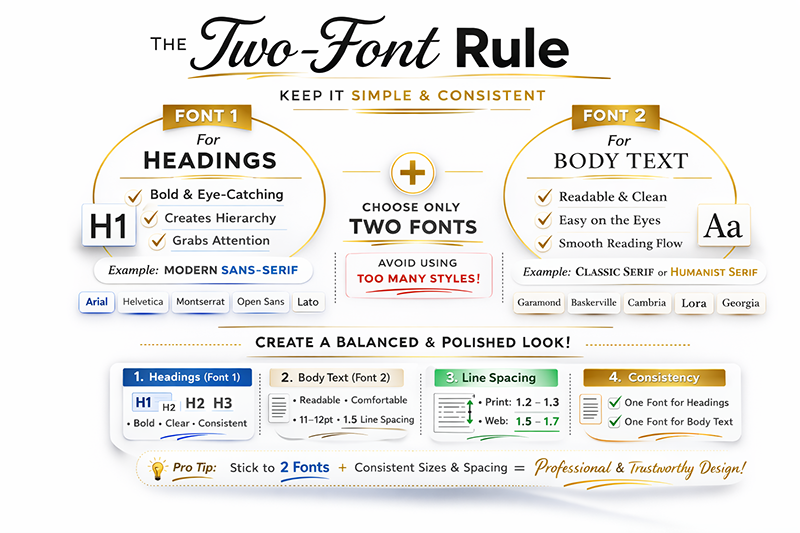
The Two-Font Rule (One of the Smartest Design Principles)
One of the easiest ways to improve almost any book, blog, or digital publication is to follow a simple professional rule:
Use one font for headings and one font for body text.
That may sound almost too simple, but it works because it creates clarity and consistency.
Many beginners use too many fonts in an attempt to make pages feel exciting. Usually, the opposite happens. The layout becomes visually noisy, inconsistent, and less trustworthy.
Two carefully chosen fonts create structure, contrast, and confidence.
Understanding the Two Main Font Families
Sans-Serif Fonts (Best for Headings)
Sans-serif fonts do not have decorative finishing strokes at the ends of letters. They tend to look clean, modern, and direct.
Popular examples include:
- Arial
- Helvetica
- Open Sans
- Montserrat
- Lato
These fonts often work well for:
- Titles
- Chapter headings
- Subheadings
- Labels
- Modern digital layouts
A favorite choice for many creators is Montserrat because it offers multiple weights and styles, making it flexible for branding.
Serif Fonts (Best for Body Text)
Serif fonts include small finishing strokes—sometimes called tails or feet—at the ends of letters.
Popular examples include:
- Garamond
- Baskerville
- Cambria
- Lora
- Georgia
These fonts have been trusted in publishing for generations because they often feel comfortable during longer reading sessions.
Those subtle strokes help guide the eye across lines of text, which is one reason serif fonts remain common in novels, nonfiction books, memoirs, and educational works.
Why the Two-Font Rule Works
Using two fonts creates:
- Clear visual hierarchy
- Stronger contrast between headings and body text
- Better consistency from page to page
- A cleaner overall design
- A more professional reading experience
Using too many fonts often creates:
- Visual clutter
- Confusion
- Weak branding
- A template-like appearance
- Lower trust
When in doubt, simplify.
Professional design usually feels calm, not chaotic.
Avoid This Common Beginner Mistake
Many new creators default to Times New Roman simply because it is familiar and readily available.
While useful in some settings, Times New Roman was originally designed for newspaper efficiency—fitting a high volume of text into limited space.
That goal is different from book design.
Books should optimize comfort, rhythm, and readability.
Do not choose fonts simply because they exist on your computer. Choose fonts because they support the reading experience.
Your reader should notice the story, the lesson, or the message—not the font itself.
Proven Readable Fonts Used in Real Publishing
Strong Serif Choices for Books
- Garamond
- Baskerville
- Cambria
- Lora
- Georgia
Strong Sans-Serif Choices for Headings & Digital Use
- Arial
- Helvetica
- Open Sans
- Montserrat
- Lato
These fonts remain popular because they are balanced, readable, reliable, and familiar to audiences.
Recommended Starting Font Sizes
While every project is different, the following sizes are strong starting points.
Printed Books (6 x 9 or Similar)
- Chapter Titles: 22–30 pt
- Subheadings: 14–18 pt
- Body Text: 10.5–12 pt
- Page Headers: 9–10 pt
- Captions: 9–10 pt
Children’s Books (8 x 10 or Larger)
- Titles: 28–40 pt
- Body Text: 14–20 pt
This depends on age group, illustration space, and reading level.
Blogs / Websites
- H1 Title: 36–48 px
- H2 Headings: 28–34 px
- H3 Headings: 22–26 px
- Body Text: 18–20 px
- Line Height: 1.6–1.8
Golden Rule
Choose a size that feels comfortable after ten minutes of reading, not just ten seconds of looking.
If you are unsure, ask ChatGPT:
What font sizes should I use for a 200-page nonfiction book with a 6 x 9 trim size?
What Comes Next
Typography gives your book structure.
Color gives it personality.
One builds readability. The other builds emotion and recognition. To look professional, you need both to work together.
In the next section, we’ll cover one of the fastest ways to improve how any book, blog, or brand feels: Color.
Section 2 – Color: The Fastest Way to Change How Your Book Feels
Typography shapes readability.
Color shapes emotion.
Before a reader studies your words, they react to the atmosphere of the page. Colors influence trust, energy, calmness, excitement, professionalism, and mood—often within seconds.
That is why two books with the same text, same layout, and same font can create completely different impressions.
One feels polished and intentional.
The other feels cheap, chaotic, or unfinished.
Color is not decoration.
Color is communication.
When used well, color helps guide the eye, reinforce your message, and make your work more memorable. When used poorly, it creates distraction, confusion, and visual fatigue.
For modern creators, this matters more than ever. Readers compare your book not only to other books, but to websites, apps, YouTube channels, magazines, and professional brands.
The visual standard has risen.
Fortunately, the rules of color do not need to be complicated.
Why Most Creators Get Color Wrong
Many beginners make one of three common mistakes.
- Using Too Many Colors
Red headings. Blue captions. Green callouts. Purple buttons.
The page becomes noisy and inconsistent.
Professional design usually uses restraint.
- Using Harsh Contrast
Pure black text on a pure white background can feel sharper and more tiring than necessary, especially on screens.
A softer dark gray often creates a smoother reading experience.
Good alternatives include:
- #333333
- #222222
Small change. Big difference.
- Choosing Colors With No System
Many creators choose colors one at a time.
A heading color here. A highlight color there. Something different later.
The result often feels random.
A professional look usually comes from a planned palette, not isolated decisions.
The Simple 3-Color Rule
One of the easiest ways to improve any design is to limit yourself to three core colors.
Primary Color
Your main brand or theme color.
Used for headings, buttons, accents, or major visual elements.
Secondary Color
Supports the primary color.
Used occasionally for contrast or emphasis.
Neutral Color
Used for body text, backgrounds, borders, and balance.
Common choices include charcoal, gray, navy, cream, beige, or off-white.
This system creates consistency without becoming boring.
It also makes future design decisions faster.
Understanding Color Psychology
Colors often carry emotional associations. While context matters, certain patterns appear repeatedly.
Blue
Trust, intelligence, calmness, stability
Strong for:
- Business books
- Educational brands
- Professional websites
Green
Growth, freshness, optimism, balance
Strong for:
- Wellness topics
- Personal development
- Nature-related themes
Yellow
Energy, friendliness, warmth
Strong for:
- Children’s books
- Creative projects
- Attention accents
Red
Urgency, power, passion
Best used carefully for emphasis.
Purple
Creativity, imagination, premium feel
Strong for fantasy, inspiration, or artistic brands.
Black / Charcoal
Authority, sophistication, clarity
Excellent for modern typography and neutral support.
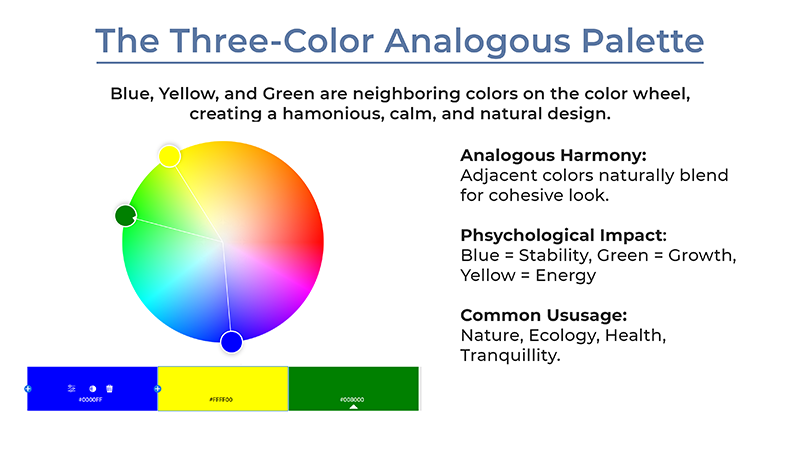
A Smart Palette Example: Analogous Color Harmony
One of the easiest ways to create a pleasing palette is to choose colors that sit near each other on the color wheel.
For example:
- Blue
- Green
- Yellow
This works well because the colors naturally relate to one another.
Benefits include:
- Harmonious appearance
- Balanced energy
- Professional cohesion
- Easier branding consistency
This is often stronger than choosing random favorite colors.
Best Color Strategies by Book Type
Children’s Books
Use brighter accents with strong readability.
Example:
- Soft blue
- Sunny yellow
- Charcoal text
Business / Nonfiction
Use calm authority.
Example:
- Navy
- Gray
- White
Memoir / Lifestyle
Use warmth and subtlety.
Example:
- Deep green
- Cream
- Soft charcoal
Self-Help / Motivation
Use clean optimism.
Example:
- Blue
- Green
- White
Free Tool Recommendation – Adobe Color
If choosing colors feels difficult, one of the best free tools available is:
color.adobe.com
Adobe Color helps you:
- Build professional palettes
- Explore harmonious combinations
- Use the color wheel intelligently
- Extract palettes from photos
- Discover trending themes
- Test ideas before redesigning your brand
Even if you never use Adobe software, this tool is worth bookmarking.
It can save hours of guesswork.
How AI Can Help You Choose Better Colors Fast
You no longer need to guess.
AI can generate targeted palettes based on audience, mood, and purpose.
Try prompts like:
Suggest a professional 3-color palette for a self-publishing website. Include hex codes.
Create a playful palette for a children’s spider book about friendship.
Recommend calming colors for a memoir cover and matching blog theme.
Give me 3 readable heading colors that pair with body text #333333.
AI can shorten trial-and-error dramatically while giving you ideas you may not have considered.
Quick Color Rules That Instantly Improve Design
- Use no more than 3 core colors
- Use one accent color for emphasis
- Keep body text dark and readable
- Test contrast before publishing
- Repeat colors consistently across pages
- Use the same palette across blog, video, and branding when possible
Consistency creates professionalism.
Closing Thoughts – Great Content Deserves Great Presentation
Many creators focus only on writing.
But readers experience your design before they experience your message.
That means presentation matters.
Typography builds trust.
Color builds emotion.
Formatting builds polish.
When all three work together, your content feels easier to read, more valuable, and more professional.
The good news is that you do not need to be a trained designer.
You only need the right rules—and now you have them.
Use these principles on your next book, blog post, workbook, or digital product, and you will instantly rise above the average creator.
What’s Next on AI Tech Publishing
If this helped you, explore more guides on using AI to:
- Create books faster
- Design products professionally
- Build publishing systems
- Market smarter
- Turn ideas into income assets
Because today, smart creators are not just writing.
They are building brands.